
Blog-Beitrag
Secure all the ways people work in the browser by setting rules and controlling access to the SaaS apps, AI tools, and websites your organization uses, all included with Business Max.
No credit card required for trial. After the trial, Business Max is {LPBusinessSSOMFA} per user/month.
Orgs experienced a SaaS-related security incident in the past year
Orgs experienced a SaaS-related security incident in the past year
Orgs experienced a SaaS-related security incident in the past year

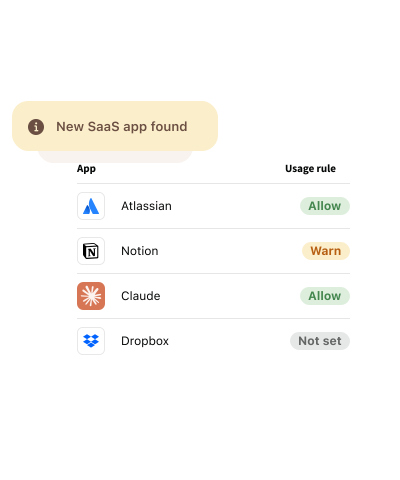
You can only protect what you can see. Uncover the SaaS apps, AI tools, and websites employees use so you can identify risks and make informed decisions.
Kunden sichern ihre Passwörter mit LastPass ab

Bewertung in Chrome und App Store
Basierend auf über 79.300Bewertungen

Leader in der Passwortverwaltung
Basierend auf mehr als 1.599 BewertungenUnternehmen setzen auf LastPass


Ich versende Warnungen, anstatt Apps zu sperren. Auf diese Weise verstehen die Mitarbeiter die Risiken, ohne sich eingeschränkt zu fühlen. Das baut Vertrauen auf.


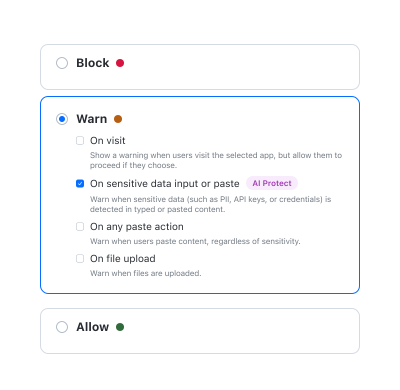
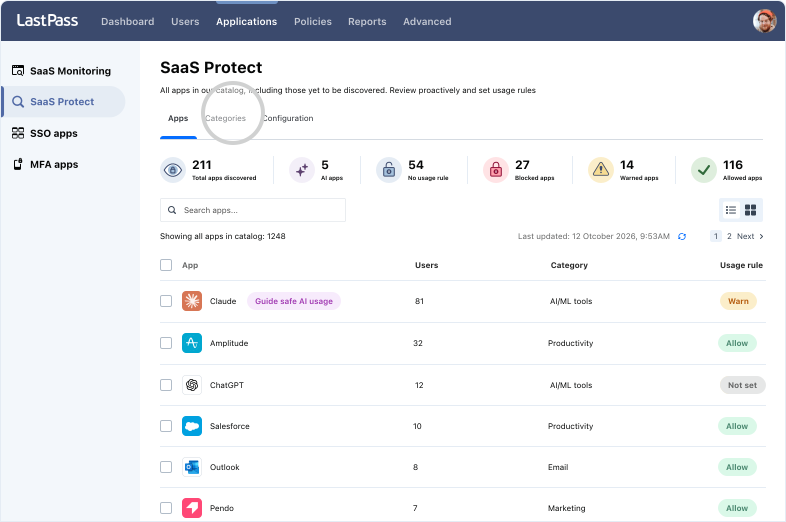
SaaS security is the practice of managing which cloud apps employees use, how they access them, and what company data goes into them. LastPass Monitoring helps by discovering which SaaS apps, AI tools, and websites your employees are accessing. Then, LastPass Protect lets your admins assign "allow," "warn," or "block" access based on company policy. In short, the same platform supports AI access security, SaaS monitoring, and enterprise web filtering.
Start with visibility, not policy. SaaS Monitoring & AI Monitoring shows you which SaaS & AI tools your team is using, the foundation of SaaS & AI app security. Next, set “allow,” “warn,” or “block” rules on the highest risk access. "Warn” is a good default for small teams. Employees see a short in-browser message and can still proceed, so you get visibility and a moment of awareness without breaking workflows. All of this is easy to deploy: Since LastPass runs through the browser extension, there’s no need for agents, proxies, or network changes.
Microsoft 365 provides strong visibility into Microsoft services and managed identities. However, employees may still access SaaS apps, AI tools, and websites outside your Microsoft tenant. Our data confirms this: 65.5% of apps employees sign up for go unused within 30 days, and consumer AI tools often sit outside SSO and central monitoring. LastPass watches in-browser activity, providing AI usage monitoring and SaaS visibility for apps outside your Microsoft tenant.
If you can’t currently see which SaaS apps and AI tools your team is accessing, the upgrade starts paying for itself through visibility. Business Max provides SaaS Monitoring & Protect, AI Monitoring & Protect, and Web Monitoring & Protect, so it works as one security solution instead of separate tools for app discovery, AI controls, and enterprise DNS filtering. It also shows you unused and duplicate subscriptions you can cancel. Gartner expects organizations without centralized visibility to overspend on SaaS by at least 25% through 2027. To see your own numbers before you decide, try a LastPass Business Max trial now (no credit card required).
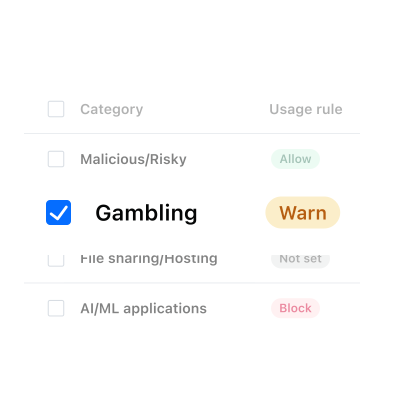
Many SaaS security tools focus on only one area, such as AI access governance, SaaS discovery, or enterprise web filtering. LastPass Business Max provides all three: Web Protect blocks malicious and credential-harvesting sites by category, AI Protect warns before credentials or sensitive data are shared with AI tools, and SaaS Protect controls which SaaS apps employees can use. LastPass also adds credential lifecycle management and Dark Web Monitoring.

