LASTPASS MONITORING

See risk where work happens

Gain visibility into the SaaS apps, AI tools, and websites employees use in the browser, all included with Business Max.

No credit card required for trial. After the trial, Business Max is {LPBusinessSSOMFA} per user/month.

Your business tools have grown past what IT can see

Teams sign up for apps, try AI tools, and visit new sites every day. Most of it happens outside the identity tools intended to cover it. That's the visibility gap.

65.5%

Apps go unused within 30 days after signing up

46%

Orgs report moderate to high shadow AI, while 19% don't know the extent

51%

Browser-based phishing attempts using brand impersonation
Monitor every attack surface in one place

What are SaaS apps?

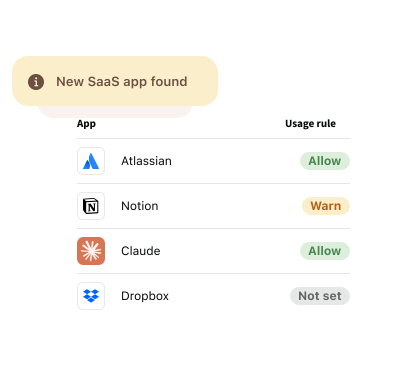
SaaS applications are the cloud-based tools employees use every day, from CRMs and messaging platforms to project management software and file-sharing services. With 30,000+ SaaS apps on the market and the average organization using over 100 of them, it's easy for SaaS sprawl to grow beyond IT oversight.

The problem: No visibility into your SaaS footprint

SaaS apps are easy to adopt, which also makes them easy to miss. Employees can sign up for a new tool in minutes, often without a security review or any involvement from IT. Without continuous SaaS discovery, you can’t see which apps are in use, who is using them, or what data they hold.

Measure your SaaS sprawl

  • Discover shadow SaaS: Identify approved and unapproved applications operating outside your SSO environment, even if they sign in with their personal email.
  • Keep usage aligned with policy: Monitor app adoption and activity to help enforce application policies and reduce risk.
  • Stay audit-ready: Track app usage, policy enforcement, and user activity with detailed reporting and audit logs.

What are AI tools?

ChatGPT. Claude. Gemini. AI tools are quickly becoming part of everyday work, helping employees research, write, analyze, and create faster than ever before. But when adopted without oversight, they can introduce new security and compliance risks.

The problem: No visibility into AI usage

Employees often choose their own AI tools or use personal accounts, even if it goes against company policy. Without visibility into these tools, IT can't properly evaluate risk, create guardrails, or ensure company data is being handled appropriately.

Get an eye on shadow AI

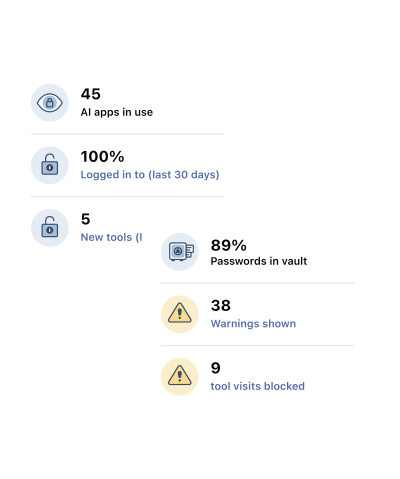
  • Discover AI tools in use: Identify approved and unapproved AI tools employees access across your organization.
  • Understand how AI is accessed: See whether employees use SSO, managed credentials, or personal accounts to access AI tools.
  • Monitor AI adoption and activity: Track which users are using which AI tools to help identify potential risks and policy violations.
  • Support shadow AI governance and compliance: Export usage reports and document AI oversight to help demonstrate responsible AI use.

What are websites?

We're not here to explain the internet. But we should point out that not every website deserves your trust. While your team relies on countless legitimate websites to get work done every day, the web is also home to fake download sites, phishing pages, and malware-filled domains where risk can hide in plain sight.

The problem: No visibility into web activity

Risks often start with an ordinary web visit. An employee downloads software from a fake website. Another enters their credentials into a phishing page designed to look like Microsoft 365. Without visibility into browsing activity, it's difficult to know which websites employees are accessing and the risks they may introduce.

See where work wanders on the web

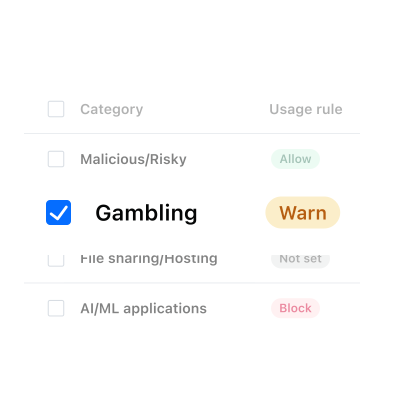
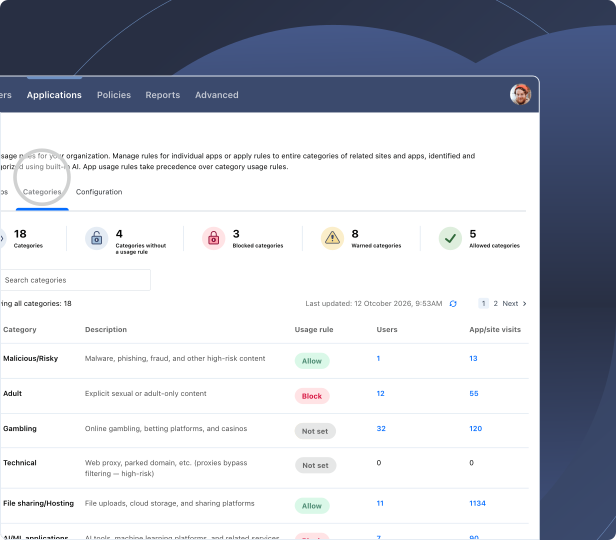
  • See website activity by category: Understand where employees spend time online with website activity organized by category and recency.
  • Discover potentially risky websites: Identify the websites employees access and gain visibility into web activity that may introduce security risks.
  • Understand web usage patterns: Review website activity by site and category to spot trends, investigate concerns, and make more informed security decisions.

Monitoring is only half the battle

You've uncovered the risks across your SaaS apps, AI tools, and web activity. Now take the next step to control access, enforce policies, and protect your business.

Millionen zufriedener Kunden, von Experten empfohlen

Millionen

Kunden sichern ihre Passwörter mit LastPass ab

Bewertung in Chrome und App Store

Basierend auf über 79.300Bewertungen

Leader in der Passwortverwaltung

Basierend auf mehr als 1.599 Bewertungen

> Über 100.000

Unternehmen setzen auf LastPass

Ich versende Warnungen, anstatt Apps zu sperren. Auf diese Weise verstehen die Mitarbeiter die Risiken, ohne sich eingeschränkt zu fühlen. Das baut Vertrauen auf.

logo_trust-garden_holt-cat-svg

Learn more about Business Max

Blog-Beitrag

How modern identity security defends against the newest browser-based attacks

Blog-Beitrag

How to gain visibility into AI app sprawl without breaking client delivery

Frequently asked questions

Many organizations know employees are adopting new AI tools and SaaS apps but lack the time, staff, or infrastructure to continuously track them. LastPass Business Max can provide SaaS discovery and shadow AI governance through the LastPass browser extension. With built-in monitoring and governance capabilities, your team can monitor shadow AI and SaaS adoption, identify potential risks, and apply controls without deploying additional agents, proxies, or more staff.

You can see SaaS usage without a full Defender deployment. LastPass SaaS Monitoring runs through the LastPass browser extension, so you get a live view of new apps, unused apps, and credential exposure without configuring multiple consoles.

Defender for Cloud Apps is powerful, but it works best when it's fully deployed and staffed to run. If you already use Defender, LastPass complements it. Defender discovers and assesses apps, while LastPass covers how people sign in, including apps outside SSO.

It depends on whether your core problem is SaaS operations or SaaS security. SaaS management platforms like Zluri connect to finance systems and identity providers, which makes them strong for license optimization and renewals.

LastPass SaaS Monitoring discovers SaaS usage, identifies apps operating outside SSO, highlights inactive apps, and provides visibility into credential-related risks. And SaaS Protect adds policy controls that can be applied on a per-app basis.

If your primary focus is SaaS operations and license management, you may prefer a SaaS management platform. If you're looking to improve SaaS discovery and access security, you may benefit from LastPass. Some organizations use both to address different aspects of SaaS governance.

For most small to mid-sized teams, browser-level visibility and governance can be a practical first step towards addressing AI, SaaS, and web-related risks, while a full SSE platform could be useful for broader network-level inspection and control as security requirements mature.

An SSE platform can inspect traffic across the network, providing deeper enforcement capabilities, but it often requires agents, network configuration, and ongoing tuning. LastPass needs no new agents, DNS changes, or proxy setup. It gives you SaaS and AI visibility, in-browser AI guardrails, and enterprise web filtering via the LastPass browser extension. Note: Your organization may require an SSE platform if you need inline inspection of all network traffic or coverage beyond the browser.

To accelerate AI adoption and reduce risk at the same time, leverage the sequence LastPass capabilities are built around: See it first and then govern.

In the 2026 State of AI & SaaS Security Report, 68% of IT leaders named sensitive data entering AI tools as their #1 concern, yet their confidence in detecting it was just 2.5 out of 5.

With LastPass Business Max, these capabilities are at your fingertips:

  • AI Monitoring shows which AI tools your team uses and how they sign in.
  • AI Protect lets you apply usage rules: "Allow" for approved tools, "Warn" for unknown ones, and "Block" for unapproved or risky tools.
  • Finally, AI Protect adds in-the-moment usage guidance, with warnings when someone is about to share credentials, API keys, or customer data with tools like ChatGPT, Copilot, Claude, or Gemini.

To approve some AI tools and warn people off others, set a rule for each tool in AI Protect:

  • "Allow" provides access to approved AI tools, so employees get through without friction, and IT still sees the access.
  • "Warn" shows an in-browser notice at login explaining the AI tool sits outside IT oversight, with a redirect to an approved alternative.
  • "Block" prevents access and explains why. Rules can apply to individuals or groups, so you get friction only where you need it. Every warning is logged, so you can see AI adoption trends and risky behavior over time.

AI Protect also lets you reinforce security awareness training by alerting your employees before credentials, API keys, or other sensitive data are shared with AI chatbots like Claude, Gemini, CoPilot, or ChatGPT. Essentially, AI Protect acts as another layer of defense by reinforcing security awareness at the moment of risk, before data leaves your organization.

Don't see your questions here? Visit Support Center.

Erste Schritte mit LastPass Business

Für die 14-tägige Testversion ist keine Kreditkarte erforderlich.