LASTPASS PROTECT

Stop risk where work happens

Secure all the ways people work in the browser by setting rules and controlling access to the SaaS apps, AI tools, and websites your organization uses, all included with Business Max.

No credit card required for trial. After the trial, Business Max is {LPBusinessSSOMFA} per user/month.
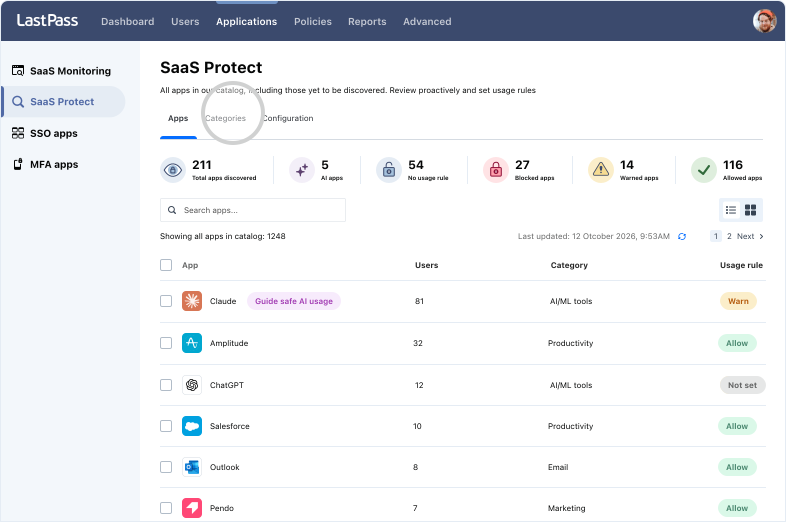
Policies only matter if employees follow them

Every unapproved app, AI tool, and website creates another opportunity for employees to work outside your security standards. The challenge isn't writing policies. It's enforcing them.

75%

Orgs experienced a SaaS-related security incident in the past year

42%

Orgs experienced a SaaS-related security incident in the past year

1 in 3

Orgs experienced a SaaS-related security incident in the past year

Protect every attack surface in one place

What are SaaS apps?

SaaS applications are the cloud-based tools employees use every day, from CRMs and messaging platforms to project management software and file-sharing services. With 30,000+ SaaS apps on the market and the average organization using over 100 of them, it's easy for SaaS sprawl to grow beyond IT oversight.

The problem: No control over SaaS access

Getting work done in SaaS means customer and company data end up uploaded and stored across dozens, or even hundreds, of apps. Without rules for who can access which apps and how they sign in, every new app adds to your exposure.

Set rules to avoid an app-ocalypse

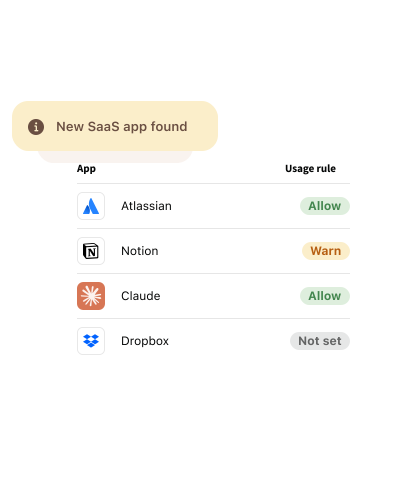
  • Control SaaS access: Allow, warn, or block apps and guide employees to approved tools.
  • Reduce SaaS risk: Limit exposure to company data and credentials by blocking unvetted or risky apps.
  • Eliminate SaaS waste: Find unused, redundant, and over-provisioned apps to reduce costs.
  • Strengthen password security: Identify weak, breached, expired, or reused passwords that are used for SaaS accounts before they create risk.

What are AI tools?

ChatGPT. Claude. Gemini. AI tools are quickly becoming part of everyday work, helping employees research, write, analyze, and create faster than ever before. But when adopted without oversight, they can introduce new security and compliance risks.

The problem: No control over AI use

When employees use unapproved AI tools or personal accounts for work, sensitive information can end up outside your organization's control. Without clear AI usage policies, your IP and customer data are at risk.

Put the AI in guardrails

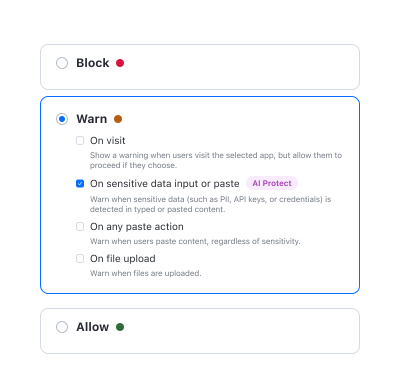
  • Control AI access: Allow, warn, or block AI tools with AI access security to stop risks before they start.
  • Protect sensitive data: Warn employees before they share credentials, API keys, or personal information with AI tools.
  • Track AI risks: Automate AI usage monitoring to see which AI tools people are using and log every policy warning for audits, compliance, and reporting.

What are websites?

We're not here to explain the internet. But we should point out that not every website deserves your trust. While your team relies on countless legitimate websites to get work done every day, the web is also home to fake download sites, phishing pages, and malware-filled domains where risk can hide in plain sight.

The problem: No control over web browsing

One wrong click on one bad website can lead to phishing, keylogging, or a malware download. Without controls on how employees browse, that one click can escalate into a data breach or business disruption.

Browse within your boundaries

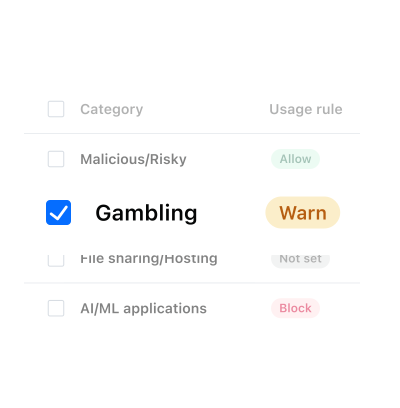
  • Categorize web activity: Automatically sort websites into 25+ categories for easier oversight.
  • Block risky websites: Automatically stop access to phishing, malware, and other high-risk destinations.
  • Control web access at scale: Allow, warn, or block entire website categories with a single rule.
  • Guide safer browsing: Show clear in-browser messages that help employees make better choices.

Governance is only half the battle

You can only protect what you can see. Uncover the SaaS apps, AI tools, and websites employees use so you can identify risks and make informed decisions.

Vertrouwd door miljoenen, erkend door experts

Miljoenen

klanten beveiligen hun wachtwoorden met LastPass

Beoordeling in Chrome en App Store

Gebaseerd op ruim 79.300 recensies

Leider op het gebied van wachtwoordbeheer

Gebaseerd op ruim 1600 recensies

100.000+

bedrijven kiezen voor LastPass

Ik verstuur waarschuwingen, maar ik blokkeer niet. Zo leren mensen om de risico's te begrijpen, zonder dat ze zich beperkt voelen. Dat bouwt vertrouwen.

logo_trust-garden_holt-cat-svg

Learn more about Business Max

Blogpost

The LastPass Allow/Warn/Block model: A smarter approach for safer AI adoption

Rapport

LastPass-rapport voor 2026 over de stand van zaken op het gebied van AI- en SaaS-beveiliging

Blogpost

From chaos to control: How to govern AI usage before it becomes a risk

Frequently asked questions

SaaS security is the practice of managing which cloud apps employees use, how they access them, and what company data goes into them. LastPass Monitoring helps by discovering which SaaS apps, AI tools, and websites your employees are accessing. Then, LastPass Protect lets your admins assign "allow," "warn," or "block" access based on company policy. In short, the same platform supports AI access security, SaaS monitoring, and enterprise web filtering.

Start with visibility, not policy. SaaS Monitoring & AI Monitoring shows you which SaaS & AI tools your team is using, the foundation of SaaS & AI app security. Next, set “allow,” “warn,” or “block” rules on the highest risk access. "Warn” is a good default for small teams. Employees see a short in-browser message and can still proceed, so you get visibility and a moment of awareness without breaking workflows. All of this is easy to deploy: Since LastPass runs through the browser extension, there’s no need for agents, proxies, or network changes.

Microsoft 365 provides strong visibility into Microsoft services and managed identities. However, employees may still access SaaS apps, AI tools, and websites outside your Microsoft tenant. Our data confirms this: 65.5% of apps employees sign up for go unused within 30 days, and consumer AI tools often sit outside SSO and central monitoring. LastPass watches in-browser activity, providing AI usage monitoring and SaaS visibility for apps outside your Microsoft tenant.

If you can’t currently see which SaaS apps and AI tools your team is accessing, the upgrade starts paying for itself through visibility. Business Max provides SaaS Monitoring & Protect, AI Monitoring & Protect, and Web Monitoring & Protect, so it works as one security solution instead of separate tools for app discovery, AI controls, and enterprise DNS filtering. It also shows you unused and duplicate subscriptions you can cancel. Gartner expects organizations without centralized visibility to overspend on SaaS by at least 25% through 2027. To see your own numbers before you decide, try a LastPass Business Max trial now (no credit card required).

Many SaaS security tools focus on only one area, such as AI access governance, SaaS discovery, or enterprise web filtering. LastPass Business Max provides all three: Web Protect blocks malicious and credential-harvesting sites by category, AI Protect warns before credentials or sensitive data are shared with AI tools, and SaaS Protect controls which SaaS apps employees can use. LastPass also adds credential lifecycle management and Dark Web Monitoring.

Don't see your questions here? Visit Support Center.

Aan de slag met LastPass Business

Geen creditcard vereist voor de proefversie van 14 dagen.